Java programming language
Concurrent programming
Basic thread management

When a Java application starts, the JVM normally creates an initial thread that executes the application’s main method. From that thread, the application can create additional threads so that several tasks can make progress concurrently. A thread is an independent path of execution inside a process; unlike a process, it does not have an independent process memory space. Threads in the same Java process can access the same objects in the heap, while each thread has its own call stack, local variables and execution state.
Java provides a rich API for creating, coordinating, interrupting and synchronizing threads. Modern Java distinguishes between platform threads, which are typically mapped to operating-system threads, and virtual threads, lightweight threads managed mainly by the Java runtime. We will start with traditional platform threads and introduce virtual threads later in this document.
1. Thread states
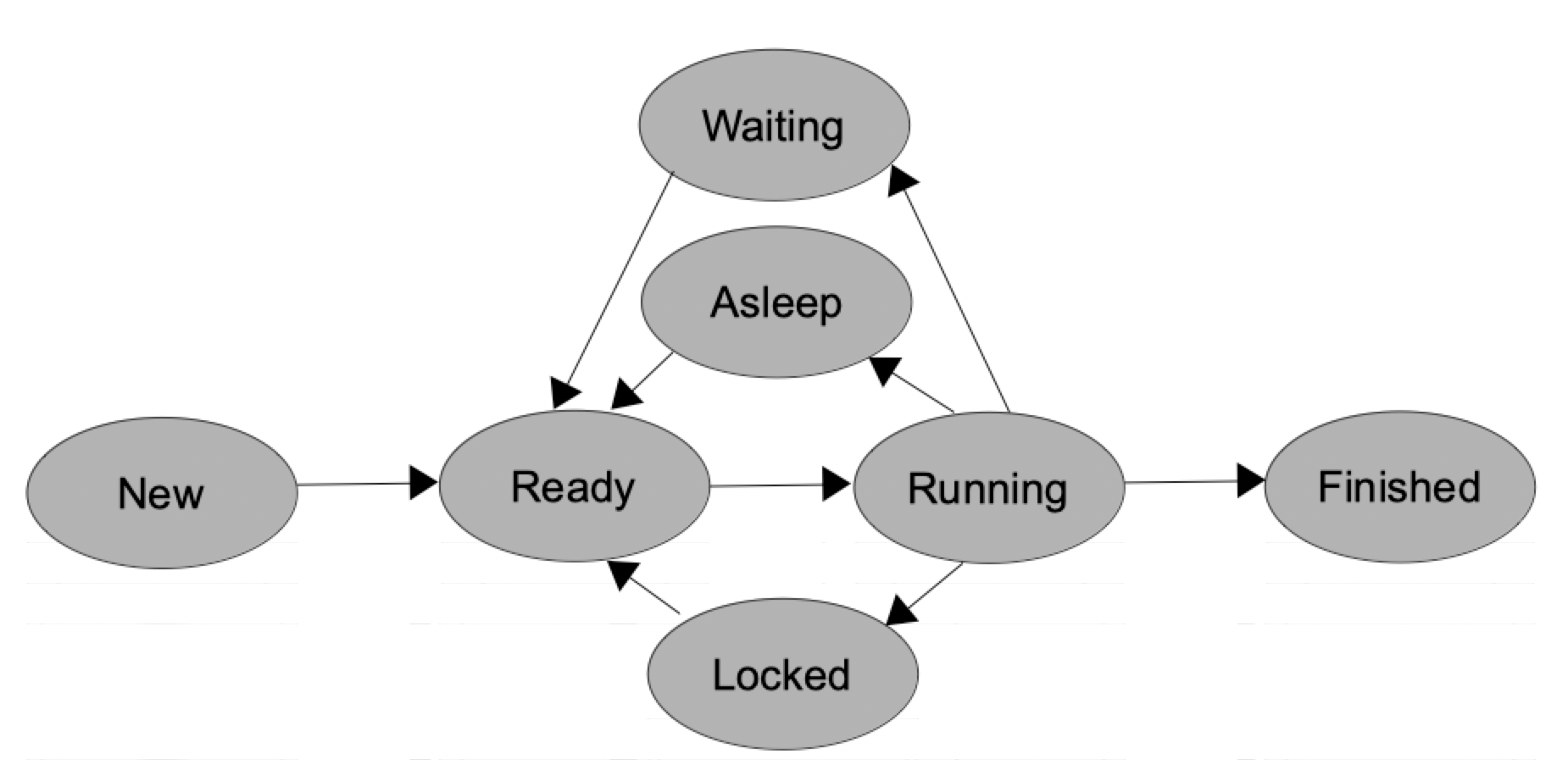
In the previous sections we used a simplified operating-system model with states such as Ready and Running. That model is useful to understand scheduling, but Java exposes its own official thread-state model through the Thread.State enumeration. A Java thread can be in one of these six states:
- NEW: the thread has been created but has not been started yet.
- RUNNABLE: the thread is executing in the JVM or is ready to execute and waiting for processor time. Java does not distinguish between Ready and Running in this enumeration.
- BLOCKED: the thread is waiting to acquire a monitor lock in order to enter a
synchronizedsection. - WAITING: the thread is waiting indefinitely for another thread to perform some action.
- TIMED_WAITING: the thread is waiting for a limited amount of time. For example, a call to
Thread.sleepputs the current thread in this state. - TERMINATED: the thread has finished its execution.
Therefore, expressions such as asleep or ready can still be useful when explaining what a thread is doing conceptually, but they are not values of Java’s Thread.State enumeration. The following diagram can be used as a simplified conceptual view of thread transitions:
Older Java versions provided methods such as suspend, resume and stop to control threads from the outside. These mechanisms were inherently unsafe and have been removed from the modern Thread API. Current Java programs should use cooperative techniques such as interruption, synchronization and shared state with the appropriate memory-visibility guarantees.
2. Basic thread handling. Creating and launching threads
2.1. Defining a thread
If we want to define a thread, we have some ways to do it:
- Inheriting from
Threadclass - Implementing
Runnableinterface
Inheriting from Thread class
There is a class in Java called Thread that can be used for creating platform threads by inheriting from it and implementing (overriding) its run method. This approach is useful for learning the basic API, although in most real applications it is preferable to separate the task from the thread and use Runnable, executors or other concurrency utilities.
public class MyThread extends Thread
{
    ... // Attributes, constructors and methods of our class

    @Override
    public void run()
    {
        // Code to be executed by the thread
    }
}
Implementing Runnable interface
We can also create a class that implements Runnable interface and implements its run method.
public class MyOtherThread implements Runnable
{
    ... // Attributes, constructors and methods of our class
    @Override
    public void run()
    {
        // Code to be executed by the thread
    }
}
In this last case, we can also use an anonymous class or a lambda expression to define the Runnable object.
Runnable lambdaRun = () -> {
    // Code to be executed by the thread
};
As you can see, in all of these cases, we need to define (override or implement) a run method from either the Thread class or the Runnable interface. This method contains the task that will be executed by the thread.
2.2. Creating and launching a thread
To start a new platform thread (remember that the main method is normally executed by an initial JVM thread), we must not call its run method directly. Calling run() is just a normal method invocation and does not start a new platform thread. Instead, we call the start method. The JVM then schedules the new thread and invokes its run method, allowing the new thread and the current one to execute concurrently.
If we defined the thread by extending Thread class, then we can create a thread object and run it with these instructions (according to previous MyThread class example):
Thread t = new MyThread();
t.start();
If we defined the thread by implementing Runnable interface, then we can create and run a thread by defining a new instance of Thread with a Runnable object as parameter. Let’s see both examples (normal class and lambda expression) created before:
// Normal class that implements Runnable
Thread t = new Thread(new MyOtherThread());
t.start();

// Lambda expression
Thread t = new Thread(lambdaRun);
t.start();
By doing this, the Thread object that we have just created knows where to find its run method: in the Runnable object that receives as a parameter.
2.3. Extending Thread or implementing Runnable?
As you will find in many other situations along your career as a programmer, there are different ways of doing the same thing. In this case, we can create and launch a thread in two flavours: by extending Thread class or by implementing Runnable interface. In the end, the behavior of the thread created will be the same, but there are some differences or reasons to choose one way and not the other:
- If you extend
Threadclass, you will not be able to extend any other class. So use this way only when your thread class does not need to inherit from anything else. This option is usual in small, simple applications. - Otherwise, you have “option B”, this is, implementing
Runnableinterface (or using anonymous classes or lambda expressions). Remember, you can implement multiple interfaces, but you can only extend one class. That is why Java leaves this open door: in case you have already extended another class, you can still have your threads on it. This option is more usual in complex applications.
2.4. Example
Let’s type an example to see how a thread works. To start with something simple, we are going to create a thread that counts from 1 to 10. As we do not need to extend from any other class, we are going to create a Thread subclass. In later examples we will use Runnable interface, so that you will see how to work with both options.
Our basic thread would be like this:
public class MyCounterThread extends Thread
{
    @Override
    public void run()
    {
        for (int i = 1; i <= 10; i++)
            System.out.println("Counting " + i);
    }
}
And our main program that creates and launches this thread looks like this:
public class MyMainCounter
{
    public static void main(String[] args)
    {
        MyCounterThread t = new MyCounterThread();
        t.start();
    }
}
Try to copy these classes in a project and run the main program to see that it works properly. Now, let’s add some changes to main program to see how its initial behavior changes. If we put this line at the end of main method:
public class MyMainCounter
{
    public static void main(String[] args)
    {
        MyCounterThread t = new MyCounterThread();
        t.start();
        System.exit(0);
    }
}
What happens when we run the program again? If you run the program multiple times, you may find that the counter prints some numbers before the JVM terminates, and the exact amount can vary. System.exit(0) initiates the JVM shutdown sequence, so the worker thread is not allowed to keep the application alive and complete normally. We therefore cannot rely on that thread finishing its task.
Now change that instruction for this one:
public class MyMainCounter
{
    public static void main(String[] args)
    {
        MyCounterThread t = new MyCounterThread();
        t.start();
        System.out.println("Hello!!");
    }
}
What happens now? Your thread counts to 10, and somewhere in between this counting a “Hello!!” message appears. It may be shown before number 1, after number 7, or at another point. The exact order is not guaranteed because both threads are scheduled concurrently.
Finally, try to call the start method again after its first call:
public class MyMainCounter
{
    public static void main(String[] args)
    {
        MyCounterThread t = new MyCounterThread();
        t.start();
        t.start();
    }
}
You will see that an exception of type IllegalThreadStateException is thrown. We can’t call the start method more than once. We have to create a new Thread object.
2.5. Conclusions
From this example, we can come to some conclusions:
- When we launch a thread from our main application, it starts executing concurrently with the thread that launched it. Whether two threads are actually executing at the same instant depends on the available processors and the scheduler.
- A normal platform thread created with
new Thread(...)is non-daemon by default when it is created by the normalmainthread. Therefore, ifmainreturns normally, the JVM normally remains alive until that worker thread finishes. - Calling
System.exitinitiates JVM shutdown. We must not expect other application threads to complete their work after that point. - There is no guaranteed order in which the main thread and its worker threads will produce their results. Later we will learn how to coordinate and synchronize threads when an ordering or shared-resource rule is required.
- A
Threadobject can be started only once. After it terminates, it cannot be restarted; a newThreadobject must be created.
2.6. Virtual threads (Java 21+)
Modern Java also provides virtual threads. A traditional thread created with new Thread(...) is a platform thread, typically backed by an operating-system thread. Platform threads are suitable for all kinds of work, but they consume more operating-system resources and therefore the number of platform threads that an application can create efficiently is limited.
A virtual thread is still a Thread object and uses the same general programming model, but it is scheduled mainly by the Java runtime instead of being permanently associated with one operating-system thread. Virtual threads are lightweight, so an application can create a very large number of them. They are especially useful for tasks that spend much of their time waiting, such as network, file, database or other blocking I/O operations. They are not intended to make long-running CPU-intensive calculations faster.
The simplest way to start one is:
Thread t = Thread.startVirtualThread(() -> {
    System.out.println("Running in a virtual thread");
});

try
{
    t.join();
} catch (InterruptedException e)
{
    Thread.currentThread().interrupt();
}
We can also use a thread builder:
Thread t = Thread.ofVirtual()
    .name("virtual-worker")
    .start(() -> System.out.println("Task running"));
The isVirtual() method tells us whether a given thread is virtual. Virtual threads are always daemon threads and their priority is always Thread.NORM_PRIORITY; changing their priority has no effect. We will see higher-level mechanisms for managing concurrent tasks in later documents of this unit.
Exercise 1:
Create a project called FibonacciThread. Define a thread subclass that shows Fibonacci numbers up to a given parameter N that will be passed to the constructor.
Remember that Fibonacci numbers are a sequence starting by 1 and 1, on which each new number is calculated by adding the two previous numbers of the sequence. So the sequence goes like this: 1, 1, 2, 3, 5, 8, 13, 21…
Exercise 2:
Create a project called MultiplierThreads. Define a thread subclass that has a number as its attribute. Assign a value to this number through the constructor of the class. In the
runmethod, the thread has to show the multiplication table of its attribute. Then, from main application, create 10 threads (each one with a different number) and launch them all at the same time. See how messages from one thread mix with other threads’ messages. For instance…
1 x 0 = 0
1 x 1 = 1
3 x 0 = 0
4 x 0 = 0
...
3. Basic thread information
There are some useful methods and properties in Thread class to get and set some information about a thread. We are going to focus on three of them for now:
- How to set and get the thread’s name
- How to get the thread state
- How to get thread’s identifier
3.1. Setting and getting the thread’s name
If you want to give a name to your threads, you can simply add an attribute name to your class (either extending Thread or implementing Runnable). But there are some methods in Thread class that let us set and get this name without adding any extra information: setName method sets our thread’s name, getName method will get this name.
Thread t = new MyCounterThread();
t.setName("MyThread A");
t.start();
System.out.println("Thread " + t.getName() + " has been launched.");
In this example, we have created a thread, set its name and then print it a few lines below. If we want to get/set thread’s name inside the thread itself (for instance, from run method of the thread), we can call currentThread method to get a Thread object that points to current thread, and then get/set its name.
@Override
public void run()
{
    Thread.currentThread().setName("AAA");
    ...
    System.out.println(Thread.currentThread().getName());
}
If you run a thread from a Runnable instance, you can set the name directly when creating the thread as the second parameter in the constructor.
Runnable counterRun = () -> {
    System.out.println(Thread.currentThread().getName() + " running");
    for (int i = 1; i <= 10; i++)
        System.out.println("Counting " + i);
};
Thread t = new Thread(counterRun, "CounterThread");
t.start();
3.2. Getting thread state
We can also get current thread state at any time. To manage these states, there is an inner enum called Thread.State, and a getState method in Thread class. The following example launches a thread and, a few lines below, checks its current state:
Thread t = new MyCounterThread();
t.start();
...
Thread.State st = t.getState();
What getState method returns can be one of the following states, that are represented by constants in Thread.State enum: NEW, RUNNABLE, BLOCKED, WAITING, TIMED_WAITING or TERMINATED. For instance, if we want to check if the thread has finished its task, we can do it like this:
if (st == Thread.State.TERMINATED)
    System.out.println("Thread is terminated.");
We can also check if a thread has finished its task with isAlive method (from Thread class):
if (!t.isAlive())
    System.out.println("Thread is terminated.");
3.3. Getting thread’s identifier
The Java Virtual Machine assigns a unique identifier to every thread that is created. In modern Java we can obtain it with the threadId() method. The older getId() method has been deprecated since Java 19.
@Override
public void run()
{
    ...
    System.out.println("Thread #" + Thread.currentThread().threadId());
}
4. The sleep and yield methods
In this section we are going to learn how to put threads to sleep, or ask them to leave the processor free.
4.1. The sleep method
When we call sleep method, the thread that is calling it automatically falls asleep (i.e. pauses its running), until the number of milliseconds indicated in the parameter expires. This is useful to let the processor free for other threads, if our current thread has nothing to do by now, or if we want to help improve the concurrency among our threads.
The sleep method is a static method of Thread class, so to call it we only have to add this instruction in the position where we want the thread to sleep, with the desired sleeping time in milliseconds:
Thread.sleep(2000);
This example puts the thread that executes the instruction to sleep during 2 seconds (2000 milliseconds). In fact, we need to catch a possible exception that can be thrown when using this method:
try
{
    Thread.sleep(2000);
} catch (InterruptedException e) {
    ...
}
sleep is a static method, so it should be called through the Thread class rather than through a thread object. The thread that executes the call is the one that sleeps. For example:
public static void main(String[] args)
{
    Thread t = new MyThread();
    t.start();
    try
    {
        Thread.sleep(2000);
    } catch (InterruptedException e)
    {
        Thread.currentThread().interrupt();
    }
}
In this case the main thread sleeps for two seconds; thread t does not. Calling a static method as t.sleep(...) is legal Java syntax but is misleading and should be avoided.
Regarding milliseconds, we can also use TimeUnit class (from java.util.concurrent package) and its properties to specify another time unit, that will be automatically converted to milliseconds. For instance, if we want our thread to sleep 5 seconds, we can also do it like this:
import java.util.concurrent.TimeUnit;
...
try
{
    TimeUnit.SECONDS.sleep(5);
} catch (InterruptedException e) { ... }
You can take a look at Java API to see more constants that you can use from TimeUnit class, such as MINUTES, HOURS, and so on. The calling to TimeUnit.sleep generates a call to Thread.sleep in fact, with the appropriate conversion to milliseconds.
4.2. The yield method
The yield method is a hint to the scheduler that the current thread is willing to give other runnable threads an opportunity to execute. It does not receive a duration and it does not guarantee that another thread will run; the scheduler is free to ignore the hint.
This method is also static, and it is also applied to the thread that calls it. It does not throw any exception when it is called, so we can use it simply like this:
Thread.yield();
Because yield is only a scheduling hint, program correctness must never depend on it. It is mainly useful in experiments or in very specific low-level situations, not as a synchronization mechanism.
4.3. Example
In this example, we are going to define a thread (implementing Runnable interface through a lambda expression) that counts from A to Z, sleeping 100ms after printing each letter. Main program will wait for this thread to finish, checking its state after each iteration.
public static void main(String[] args)
{
    Thread t = new Thread(() -> {
        for (char c = 'A'; c <= 'Z'; c++)
        {
            System.out.println(c);
            try
            {
                Thread.sleep(100);
            } catch (InterruptedException e) {
                System.err.println("Error: Thread interrupted");
            }
        }
    });

    t.start();
    do
    {
        try
        {
            Thread.sleep(100);
        } catch (InterruptedException e) { }
    } while (t.isAlive());
    System.out.println("Thread has finished, and so do I");
}
Notice that main program just sleeps a few milliseconds (they can be 50, 100, 200… it does not matter) on each iteration. It only has to wait for the thread to finish, it has nothing to do, so it better leave the processor free by sleeping or yielding.
Exercise 3:
Create a project called ThreadRace. Define a subclass of
Threadand create 3 objects of this subclass. Each one will have its own name A, B and C, and they will have to count from 1 to 1000. The main program will have to wait for all its threads to finish, and it will have to sleep 100 ms after each iteration, and write the current counting for each thread. For instance:
Thread A: 77  Thread B: 82   Thread C: 67
Thread A: 121 Thread B: 124  Thread C: 117
...
If the worker threads finish too quickly to observe intermediate values, you can increase the amount of work or add a very small
Thread.sleep(...)delay inside the loop only for demonstration purposes. Do not useSystem.gc()to slow down or coordinate threads: garbage collection is not a timing or synchronization mechanism.
5. Finishing and interrupting threads
A thread should normally finish cooperatively, allowing its own run method to return cleanly. Two common techniques are using a shared cancellation flag or using the thread interruption mechanism. Modern Java does not provide a safe operation that arbitrarily kills another thread at any point.
5.1. Finishing threads with boolean flags
Threads finish when their run method returns normally or completes abruptly because of an uncaught exception. Older Java releases had unsafe methods such as Thread.stop, but these methods have been removed from the modern Thread API. Setting a variable that refers to a Thread object to null does not stop that thread; the thread continues to execute while it is alive.
For threads that repeatedly execute a loop, we can use a boolean cancellation flag that the worker checks on each iteration. Because the flag is written by one thread and read by another, it must have the appropriate memory-visibility guarantees. For a simple independent flag, declaring it volatile is enough: a write performed by one thread becomes visible to subsequent reads by other threads.
Let’s see this method with an example. If we define a thread subclass like this one:
public class KillableThread extends Thread
{
    private volatile boolean finish = false;

    public void setFinish(boolean finish)
    {
        this.finish = finish;
    }

    @Override
    public void run()
    {
        while (!finish)
        {
            ... // Thread task
        }
    }
}
Then we can create and launch a thread from our main application, and ask the thread to finish with its setFinish method:
public static void main(String[] args)
{
    KillableThread kt = new KillableThread();
    kt.start();
    ...
    if (someCondition)
        kt.setFinish(true);
}
As soon as the worker reaches the beginning of the loop and observes that finish is true, it exits the loop and its run method terminates. Notice that volatile provides the visibility required for this simple flag; more complex shared state may require synchronization or other concurrent utilities.
Exercise 4:
Create a project called ThreadRaceKilled based on the project created in Exercise 3. Modify the main application so that, as soon as thread A gets to 700, it is asked to finish (with a boolean variable). Feel free to add all the code that you need to each class of the project.
5.2. Finishing threads with interruptions
A second and very common way of requesting cancellation is thread interruption. Calling interrupt() does not forcibly terminate the target thread. It sets its interrupted status, and the target thread must cooperate by checking that status or by reacting to an InterruptedException. Let’s see this in the following example:
public static void main(String[] args)
{
    Thread t = new Thread(() -> {
        try
        {
            while (!Thread.currentThread().isInterrupted())
            {
                System.out.println("Running");
                Thread.sleep(100);
            }
        } catch (InterruptedException e)
        {
            // We are finishing the task, so there is nothing else to do here
        }
        System.out.println("Finished by an interruption");
    });

    t.start();
    try
    {
        // Wait for a while...
        Thread.sleep(1000);
    } catch (InterruptedException e) { }

    t.interrupt();
}
In this example, the worker checks its interrupted status on every loop with isInterrupted(). From the main thread, we wait a little and then call interrupt() on the worker. If the worker is sleeping at that moment, sleep() detects the interruption and throws InterruptedException; otherwise the interrupted status remains set and the loop condition will detect it.
The InterruptedException in this example is thrown because sleep is an interruptible blocking operation. Other methods such as wait and join can also throw it. If the worker is doing computation without calling an interruptible method, it should periodically check isInterrupted(). An important detail is that throwing InterruptedException clears the interrupted status. If a method catches this exception but does not intend to finish or fully handle the cancellation, it should normally restore the status with Thread.currentThread().interrupt().
6. Thread groups and daemons
6.1. Thread groups
Java still provides the ThreadGroup class, which dates back to the earliest Java releases and groups platform threads hierarchically. It is useful to recognize this API because it still appears in Thread, but modern Java documentation recommends that new applications rarely create or manage ThreadGroup objects directly. Executors and the utilities in java.util.concurrent are normally better choices for managing groups of tasks.
A basic group, and even a subgroup, can be created like this:
ThreadGroup g1 = new ThreadGroup("Main group");
ThreadGroup g2 = new ThreadGroup(g1, "Additional group inside main group");
To add threads to a group, we can use some of the constructors available in Thread class. For instance, if we create a thread by extending Thread class, we can add it to a group with this constructor (and some others, check the API for more details):
public Thread(ThreadGroup group, String name);
If we created the thread by implementing Runnable interface, we can add it with these constructors (and some others, check the API for more details):
public Thread(ThreadGroup group, Runnable target);
public Thread(ThreadGroup group, Runnable target, String name);
Once we have added platform threads to a group, some available methods are:
activeCount: returns an estimate of the number of live platform threads in this group and its subgroups. It must not be used for program correctness or synchronization.enumerate(Thread[] array): copies live platform threads into an array on a best-effort basis. It is mainly useful for diagnostics.interrupt: interrupts the platform threads in the group.setMaxPriority / getMaxPriority: sets/gets the maximum priority permitted for platform threads in the group.
Virtual threads are handled differently: they are not included in the normal activeCount/enumerate results and are not interrupted through a user-created ThreadGroup.
Example
The following legacy-style example creates three platform threads in the same group. Each one generates a random number between 1 and 10, sleeps for that number of seconds and then prints a message. As soon as one of the three threads finishes, the main thread interrupts the group. We keep direct references to the three threads and use isAlive() rather than relying on activeCount(), because activeCount() only returns an estimate.
The code for the Runnable object is:
import java.util.Random;
import java.util.concurrent.TimeUnit;

public class MyRandomMessage implements Runnable
{
    Random r = new Random (System.currentTimeMillis());
    @Override
    public void run()
    {
        int time = r.nextInt(10) + 1;
        try
        {
            TimeUnit.SECONDS.sleep(time);
            System.out.println("Thread waited " + time +
                " seconds and finished.");
        } catch (Exception e) {}
    }
}
Then, our main program would be like this:
public static void main(String[] args)
{
    ThreadGroup g = new ThreadGroup("Random messages");
    MyRandomMessage m = new MyRandomMessage();
    Thread t1 = new Thread(g, m);
    Thread t2 = new Thread(g, m);
    Thread t3 = new Thread(g, m);
    t1.start();
    t2.start();
    t3.start();

    while (t1.isAlive() && t2.isAlive() && t3.isAlive())
    {
        try
        {
            Thread.sleep(100);
        } catch (InterruptedException e)
        {
            Thread.currentThread().interrupt();
            break;
        }
    }
    g.interrupt();
}
As soon as one of the three thread references is no longer alive, the main thread leaves the loop and interrupts the group. If either of the remaining platform threads is still sleeping, it will receive an InterruptedException and will not print its normal finish message. This example demonstrates the old group API, but new applications should normally manage tasks with executors instead.
6.2. Daemon threads
A daemon platform thread is not defined by the kind of task it performs, and being daemon does not mean that the thread is periodic or that it has low priority. Daemon status and priority are independent properties.
The important difference is related to JVM shutdown: once all started non-daemon threads have terminated, the JVM can begin its shutdown sequence even if daemon threads are still alive. Therefore, daemon threads should not be used for work that absolutely must finish before the program ends, because the JVM is not required to wait for them.
Virtual threads are always daemon threads. Their daemon status cannot be changed, and their priority is fixed at Thread.NORM_PRIORITY.
To create a daemon thread, we only have to call the setDaemon method from Thread class before starting the thread:
Thread t = new MyThread();
t.setDaemon(true);
t.start();
We can also use the isDaemon method from Thread class to check if a given thread is a daemon or not.
7. Threads, context and shared data
Threads in the same process can access the same objects when they share references to those objects, but each thread also has its own execution context, including its own call stack and local variables. Sharing an object does not automatically make access to its fields safe: if one thread writes a field and another reads it, we may need synchronization or a visibility mechanism such as volatile. Let’s take a look at the following example (some lines are numbered to be explained later):
public class ContextExample implements Runnable
{
    // Shared reference. volatile guarantees visibility between threads
    volatile Thread t;

    public void start2Threads()
    {
        // Create first thread
        t = new Thread(this);
        t.start();

        // Sleep for 5 seconds
        try
        {
            Thread.sleep(5000);
        } catch (InterruptedException e) { }

        // Create second thread
        t = new Thread(this);                  // Line #1
        t.start();

        // Sleep for 5 seconds
        try
        {
            Thread.sleep(5000);
        } catch (InterruptedException e) { }

        // Ask the currently associated loop to finish
        t = null;                              // Line #2
    }

    @Override
    public void run()
    {
        // Take initial time in milliseconds
        long ini = System.currentTimeMillis();
        while (t == Thread.currentThread())
        {
            System.out.println("Running thread (" + ini + ") ");
            // Sleep for 100 ms
            try
            {
                Thread.sleep(100);
            } catch (InterruptedException e) { }
        }
        System.out.println("Finishing thread (" + ini + ") ");
    }

    public static void main(String[] args)
    {
        ContextExample t = new ContextExample();
        t.start2Threads();
    }
}
Type or copy this code into a project. Test it and try to ask the following questions before reading their corresponding answers:
-
What does de
whilecondition ofrunmethod do?It keeps on looping while variable
tpoints to the thread that is currently running. When this sharedvolatilevariable points to another thread (it happens in Line #1), the previous thread can observe the change and finishes itswhileloop. -
Can there be two threads executing their
runmethods at the same time?Yes. As soon as Line #1 is executed, second thread is ready to start. It may happen that it starts before previous thread checks its
whilecondition or finishes itsrunmethod. In this case, both threads would be executing theirrunmethods. -
If the answer to previous question is yes, could those threads come into conflict with variable
ini, so that one thread overwrites the value previously written by the other?No,
iniis a local variable of therunmethod, so every concurrent invocation has its own local copy on that thread’s stack. However,tis an attribute of the single sharedContextExampleobject, so both threads access the same field. We declared itvolatileso changes made by one thread are visible to the others. -
How can we ask the loop associated with the current
treference to finish without creating a new thread?We can set the shared
tattribute tonull, as in Line #2. Becausetisvolatile, the worker can observe this change. Notice that assigningnulldoes not directly destroy a thread; it only changes the condition that the thread checks in its loop.
7.1. Conclusions
After testing this example, we can come to some conclusions:
- If several threads use the same object instance, they can access the same instance fields. This does not by itself guarantee safe visibility or atomic updates, so shared mutable fields may need
volatile, synchronization or other concurrency mechanisms. In the previous example,tis shared and declaredvolatile. - If a method is executed simultaneously by several threads, each invocation has its own local variables on its thread’s stack. That is why each invocation of
runhas its owninivariable. - If we instantiate a separate
Threadsubclass object for each worker, each object has its own instance fields. These objects still live in the shared heap; the threads do not get separate process memory spaces. They simply refer to different objects unless we explicitly give them references to shared data.
For instance, if we define this class:
public class MyThread extends Thread
{
    int num;

    public MyThread(int num)
    {
        this.num = num;
    }
    ...
}
then attribute num will be different for every instantiated thread. So if we type something like this:
MyThread t1 = new MyThread(10);
MyThread t2 = new MyThread(20);
Then object t1 will have its num attribute with value 10, and t2 will have it with value 20.
7.2. ThreadLocal variables
We have seen that, if we use the same object in different threads (a Runnable object or any other object), they all share this object’s data. But sometimes we will need to have an attribute that is not shared among threads. To do this, we can use the ThreadLocal class, that lets us specify a data type to create an attribute of this type, and create multiple values of this attribute, each one assigned to a different thread.
For instance, if we want our threads to have their own creation date, we will do something like this:
public class MyRunnableClass implements Runnable
{
    private static final ThreadLocal<LocalDate> creationDate =
        ThreadLocal.withInitial(LocalDate::now);
}
If we want to get the value of this attribute for each thread, we will call its get method, and if we want to assign a new value, we will call its set method. The initialValue method in the code above is executed when the attribute has no value and the thread is trying to get it. There is also a remove method that we can use to remove the value of this attribute from current thread.
Then, we can have a run method like this in our MyRunnableClass class:
@Override
public void run()
{
    System.out.println("This thread was created on " + creationDate.get());
    System.out.println("Updating creation date...");
    creationDate.set(LocalDate.now());
    System.out.println("Now the creation date is " + creationDate.get());
    System.out.println("Removing value...");
    creationDate.remove();
    System.out.println("Now the creation date is " + creationDate.get());
}
In this example, the first get() obtains the current thread’s initial value. After set(...), the second get() returns the value explicitly assigned to that thread. Calling remove() removes that thread’s current value, so the next get() initializes it again using LocalDate::now. The actual dates may of course be equal if all operations happen on the same day.